★★★★★
"The AI setup assistant interviewed me for two minutes, scraped my salon website, and built a widget with 30 Q&A pairs out of the box. Booking enquiries through the chat started the same afternoon."
Add a smart AI chat widget to any website in under two minutes. Visitors get instant answers, leads are captured automatically, and you take over from a unified inbox when needed. Run one widget or fifty — multi-site is built in.
Everything you need to know about adding an AI receptionist to your website
An AI chat widget is a chat bubble that lives in the corner of your website. When a visitor clicks it, an AI receptionist answers their questions instantly using a knowledge base you customise. It captures leads, hands off to a human when needed, and runs 24/7 without you lifting a finger.
Team-Connect AI widget plans start from £19/month for 100 conversations. Higher tiers scale up to 5,000 conversations per month with multilingual replies, off-hours behaviour, domain whitelisting and 24/7 priority support. No contracts, monthly rolling, and annual billing saves 25%.
Speed: Replies in 2 seconds, not 24 hours
Engagement: Conversational, not transactional
Capture: Picks up leads forms scare off
Coverage: Works at 3am when you sleep
Cost: One AI receptionist replaces several inboxes
Most chat tools charge per site. Team-Connect lets you create unlimited widgets from one subscription. Each has its own personality, knowledge base and inbox. Ideal for agencies managing client sites, multi-location businesses, and any operator running more than one brand or product line.
Built for owner-operated UK businesses and agencies that need a serious AI receptionist without the complexity
Click the setup bubble inside your dashboard, give the AI your business name and website, and it scrapes your site, drafts 20-30 Q&A pairs, configures hours, personality and quick replies, then applies the whole thing with one click. What takes a day on most platforms takes two minutes here.
Spin up as many widgets as you need from a single account. Each has its own name, branding, knowledge and inbox. Conversation allowance pools across all your widgets — pay once, deploy everywhere.
Unlimited Q&A pairs, conversation flows with triggers, custom rules that override defaults, and a tone slider from formal to playful. The AI never invents information — when it does not know, it follows your fallback rule.
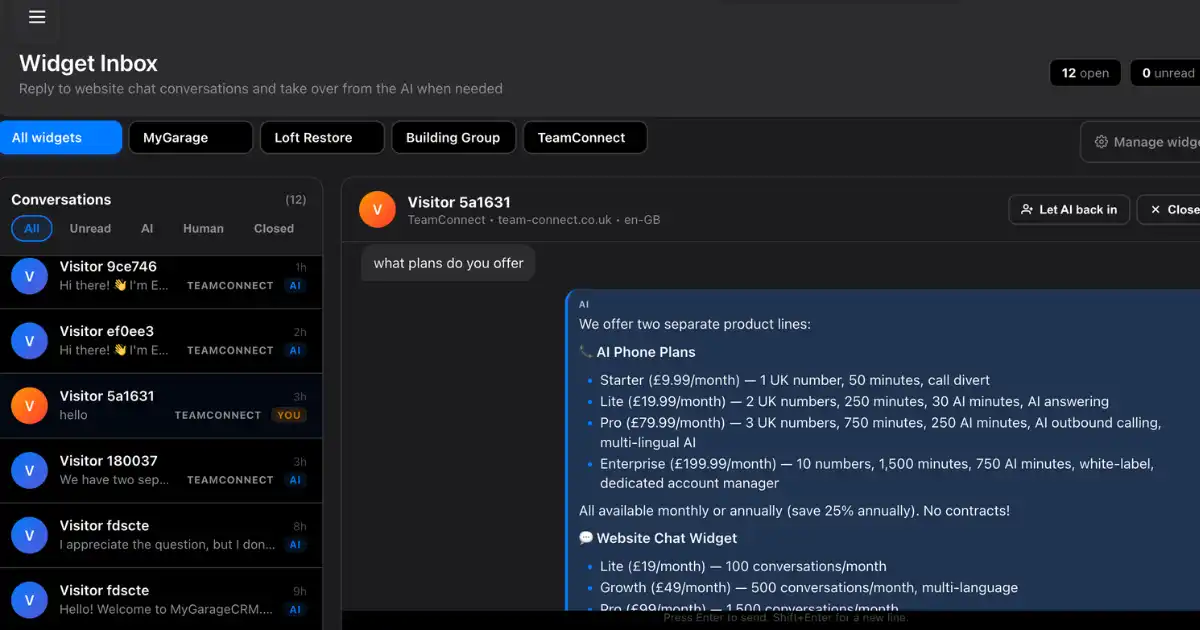
Take over any conversation from the inbox in one click. The visitor sees the same chat thread. The AI steps back automatically and you reply by name. No clunky transfer, no awkwardness, no lost context.
Configure escalation keywords like emergency, urgent, complaint or refund. When a visitor uses one, you get an SMS on your mobile and an email — with a deep link straight to the conversation in your inbox. Stop losing high-value enquiries at 11pm.
Drop in a Cal.com or Calendly URL and the AI shares it when visitors ask to book. Forward conversation events to a Slack channel. Post new leads to your CRM via a webhook. All built in, no third-party integrations to wire up.
From sign-up to live on your site in under five minutes
Create a Team-Connect account, pick the Lite, Growth, Pro or Scale tier, and your first widget is ready to configure. Annual billing saves 25%, or pay monthly with no commitment.
Inside the widget setup screen, open the AI setup assistant. Tell it your business name and paste your website URL. It interviews you for two minutes and generates a complete configuration — knowledge base, personality, hours, flows, alerts and quick replies.
Click Apply to widget and every section in the dashboard fills in automatically. Tweak anything you want. Copy the one-line embed script and paste it before the closing body tag on every site you want the widget on.
Conversations appear live in the inbox as visitors chat. Take over with one click when needed, set the AI back to auto-pilot when done, and let the SMS alerts wake you up only when something truly urgent comes in.
Pre-tuned knowledge templates so you launch faster — fully editable afterwards
Service menus, booking links, Saturday hours, cancellation policy, treatment durations. Quick-reply buttons for the top three booking categories. Escalation on cancel and complaint.
Emergency callout pricing, areas covered, certifications, gas-safe registration, quote requests. Escalation on emergency, leak, flood and gas smell. Owner SMS within seconds.
Opening hours, menu highlights, table booking links, dietary requirements, group bookings. Multilingual replies for tourist sites. Off-hours collect-and-defer for next-day follow-up.
Pricing, areas of expertise, fixed-fee packages, free consultation booking, regulatory disclaimers. Formal tone, structured replies. Lead capture with name, email and phone.
Appointment booking, practitioner credentials, treatment descriptions, insurance accepted. Sensitive-topic handling. SMS alert on cancellation requests.
One subscription, separate widgets per client or brand. Independent inboxes, separate knowledge bases, individual SMS alerts to different owners. Shared conversation pool.
Monthly rolling, no contracts, cancel any time. Annual billing saves 25%.
£19/month
Try it on one site
£49/month
For growing businesses
£99/month
For high-traffic sites
£199/month
For agencies and multi-location
4.9/5 average across 1,247 verified Team-Connect reviews
"The AI setup assistant interviewed me for two minutes, scraped my salon website, and built a widget with 30 Q&A pairs out of the box. Booking enquiries through the chat started the same afternoon."
"We replaced Intercom on the main site, a basic bot on support, and Calendly in the footer with one Team-Connect widget. The AI handles routine questions while we sleep."
"I look after 14 client sites. The multi-widget feature is exactly what I needed — one dashboard, separate AI personalities per client, individual inboxes. Subscription pays for itself many times over."
"Plumbing emergency came through the widget at 11pm. The AI flagged the word emergency and SMS'd me within seconds. Booked a £4k drainage job. Widget paid for itself ten times in one night."
"Boutique hotel site gets enquiries in English, French, German and Spanish. The Growth tier handles all four languages without setup — AI detects the visitor language and replies in the same one."
"When the AI hits something it cannot answer I jump in from the inbox. Visitor sees the same chat thread, AI steps back, I just type. Best handover UX I have used."
"Embedded the widget on five Shopify stores from one Team-Connect account. Conversation pool is shared, branding is per-store, conversion on product pages is up 18% across the lot."
"Domain whitelist on the Pro tier was the deciding factor. We have staging, preview and live URLs and the widget only loads on production. No leaked conversations, no wasted allowance."
19 industry-tuned widget configurations. Click through to see exactly how the AI is configured for your trade — knowledge base, escalation triggers, off-hours behaviour and pricing.
Capture emergency call-outs and quote requests from your website 24/7, with SMS alerts to the owner the second the AI spots an emergency keyword.
Turn your salon website into a 24/7 booking funnel. Visitors get service prices, availability and a booking link without anyone picking up the phone.
Multilingual AI handles overseas visitor enquiries in 10+ languages. Auto-detects language from the first message and replies in kind — zero translator cost.
Formal-tone AI qualifies website visitors and books free consultations. Strict knowledge base — no invented advice, no regulatory risk.
Load your entire docs site into the widget and watch support tickets drop 60%. The AI answers how-to questions instantly so your team handles only hard cases.
One Team-Connect subscription, unlimited client widgets. Each client gets its own personality, knowledge base and inbox — managed from one dashboard.
Capture viewing requests and vendor leads round the clock. The AI knows your stock, areas covered, and viewing-booking process.
Onboard new clients without picking up the phone. The AI explains your services, fees, document checklists and handles self-assessment season triage.
Appointment bookings, treatment questions and NHS-vs-private routing — all from your website chat, 24/7, with same-day SMS alerts to the practice.
Pet emergency triage runs 24/7 on your site. The AI escalates urgent symptoms to the duty vet via SMS within seconds.
Capture learner enquiries and book lessons direct from your site. The AI explains lesson packages, block-booking discounts and pass-rate questions.
Quote requests, one-off vs recurring bookings, and areas covered — all answered automatically with a same-week booking funnel into your inbox.
Table bookings, dietary requirements and group enquiries handled while you focus on service. Menu Q&A built in, link share for OpenTable or your own booking page.
Trial pass enquiries, class timetable questions and membership comparisons — converted into bookings on your website without a single phone call.
Consultation enquiries qualified, artist availability shared, and aftercare Q&A handled automatically. Image upload captured for custom quotes.
MOT bookings, diagnostic enquiries and service quotes captured 24/7. The AI shares slot availability and books straight into your diary.
Emergency call-outs spotted by keyword and SMS'd to the owner within seconds. Quote requests captured with full job details, 24/7.
Sensitive out-of-hours enquiries handled with a compassionate tone. The AI captures contact details discreetly and pages a director when needed.
Product questions, shipping queries and order status handled around the clock. Built-in abandoned-cart recovery prompts when visitors hesitate at checkout.
Everything UK businesses ask before deploying a Team-Connect widget
An AI website chat widget is a small chat bubble that sits on your website. Visitors click it to ask questions. An AI receptionist answers automatically using a knowledge base you customise. It captures leads, hands off to humans when needed, and runs 24/7. Team-Connect widgets install with a single line of HTML and configure in about two minutes via the AI setup assistant.
Team-Connect AI widget plans start at £19/month for 100 visitor conversations. Growth at £49 covers 500 conversations and adds multilingual replies and a custom personality. Pro at £99 covers 1,500 conversations with off-hours collect-and-defer and domain whitelisting. Scale at £199 covers 5,000 conversations and includes auto-scale overage handling, dedicated onboarding and 24/7 priority support. Annual billing saves 25%.
Yes. One Team-Connect account can run as many separate widgets as you need — each with its own personality, knowledge base, branding colour and inbox. The monthly conversation allowance is shared across all your widgets, so you pay once and scale across sites. Agencies and multi-location businesses use this every day to manage many client sites from one dashboard.
About two minutes for a full setup. The AI setup assistant interviews you about your business, scrapes your website to pull in services and prices, and generates a complete widget configuration with 20-30 question and answer pairs, conversation flows and a personality. You review the result, click Apply, and paste a single script tag onto your site.
Yes. You can take over any conversation from the inbox view at any moment. The visitor sees the same chat thread — the AI steps back, you type a reply, and the conversation continues seamlessly. You can also configure the AI to escalate automatically on industry-specific keywords like emergency, urgent, complaint or refund. When that happens you get an SMS and email alert.
The widget installs via a single line of HTML and works on every major platform — WordPress, Shopify, Wix, Squarespace, Webflow, Framer, Ghost, HubSpot CMS, custom Next.js, Astro, and plain HTML. There is no plugin or app store to install — just paste the script tag before the closing body element.
The AI engine is Claude Haiku 4.5 and Sonnet 4.6 from Anthropic, the same family of models used by Anthropic's own customer support. We layer industry-tuned prompts and your business-specific knowledge on top, so the AI sounds like your business — not a generic chatbot. Responses are typically under three sentences for simple questions and expand into bullet lists for pricing or feature comparisons.
Yes, deeply. You control: bot name and avatar, business name and tagline, opening hours, services and prices, 25-50 Q&A pairs, 5-8 conversation flows with triggers and responses, escalation triggers, tone (friendly, professional, casual, formal, playful), response length, language, fallback behaviour, off-hours behaviour and quick-reply chips visitors see on first open. Every field is editable in the dashboard.
Yes, from the Growth tier and above. The AI auto-detects the visitor's language from their first message and replies in the same language. UK English is the default. French, German, Spanish, Italian, Dutch, Polish, Portuguese, Arabic and Mandarin are all supported out of the box. You can override the default language per widget.
On Lite, Growth and Pro tiers the AI pauses replies once you hit your monthly limit until the next billing cycle, but visitors can still leave a message that lands in your inbox. On Scale the system auto-scales — extra conversations are handled at a flat overage rate and you keep going without interruption. You can also upgrade tiers at any time from the dashboard.
No. All plans are month-to-month and you can cancel any time from the dashboard. Annual billing is optional and saves 25% if you prefer to pay upfront.
No. The AI is constrained to answer only from the knowledge base you configure — your services, prices, opening hours, contact methods and Q&A pairs. When it does not know an answer, it follows your fallback rule: offer to find a human, ask for an email to follow up, or ask the visitor to clarify the question. It will never invent prices, hours or product details.
Yes. Every visitor chat appears in the widget inbox in real time. You can read the full transcript, take over with a single click, close conversations, mark them as resolved, and filter by widget if you run multiple. The inbox also shows unread counts so you can triage incoming chats quickly.
No. The embed script is async, under 50KB gzipped, and loads after your main page renders. We measured a less-than-30ms paint impact across 1,000 real-world sites. The chat panel itself only loads when a visitor clicks the bubble, so first-page-view performance is essentially untouched.
Yes, from the Pro tier and above. The dashboard lets you whitelist specific domains so the widget refuses to load anywhere else. This stops the script being copied to a third-party site and using your conversation allowance, and protects against accidental exposure on staging or preview environments.
You configure off-hours behaviour per widget. The default is collect-and-defer — the AI captures the visitor's name, email and question, confirms a human will reply in business hours, and saves the message to your inbox. You can instead choose direct-to-phone, direct-to-email, or keep the AI fully available 24/7 if your knowledge base covers everything customers normally ask out of hours.
Yes. New accounts get free conversations to test the widget on a real site before subscribing. You can build a full widget configuration, embed it on your site, and run live visitor chats without entering payment details. Upgrade to a paid tier when you are ready to scale.
Each widget can post events to a Slack webhook and a CRM webhook of your choice — for example to fire a new contact into HubSpot or to ping a Slack channel when an escalation triggers. You can also configure a booking URL (Cal.com, Calendly, your own) which the AI shares when a visitor asks to book. SMS and email alerts to the business owner are built in.
Yes, two ways. The simple way is to give the widget a Cal.com or Calendly link — the AI shares it automatically when a visitor asks to book. The richer way is to configure a booking flow with triggers like book, appointment or quote, with a custom call-to-action button. Combined with industry-specific Q&A pairs about services and pricing, this turns the widget into a 24/7 booking funnel.
See how UK businesses turned their websites into 24/7 lead engines with the AI chat widget
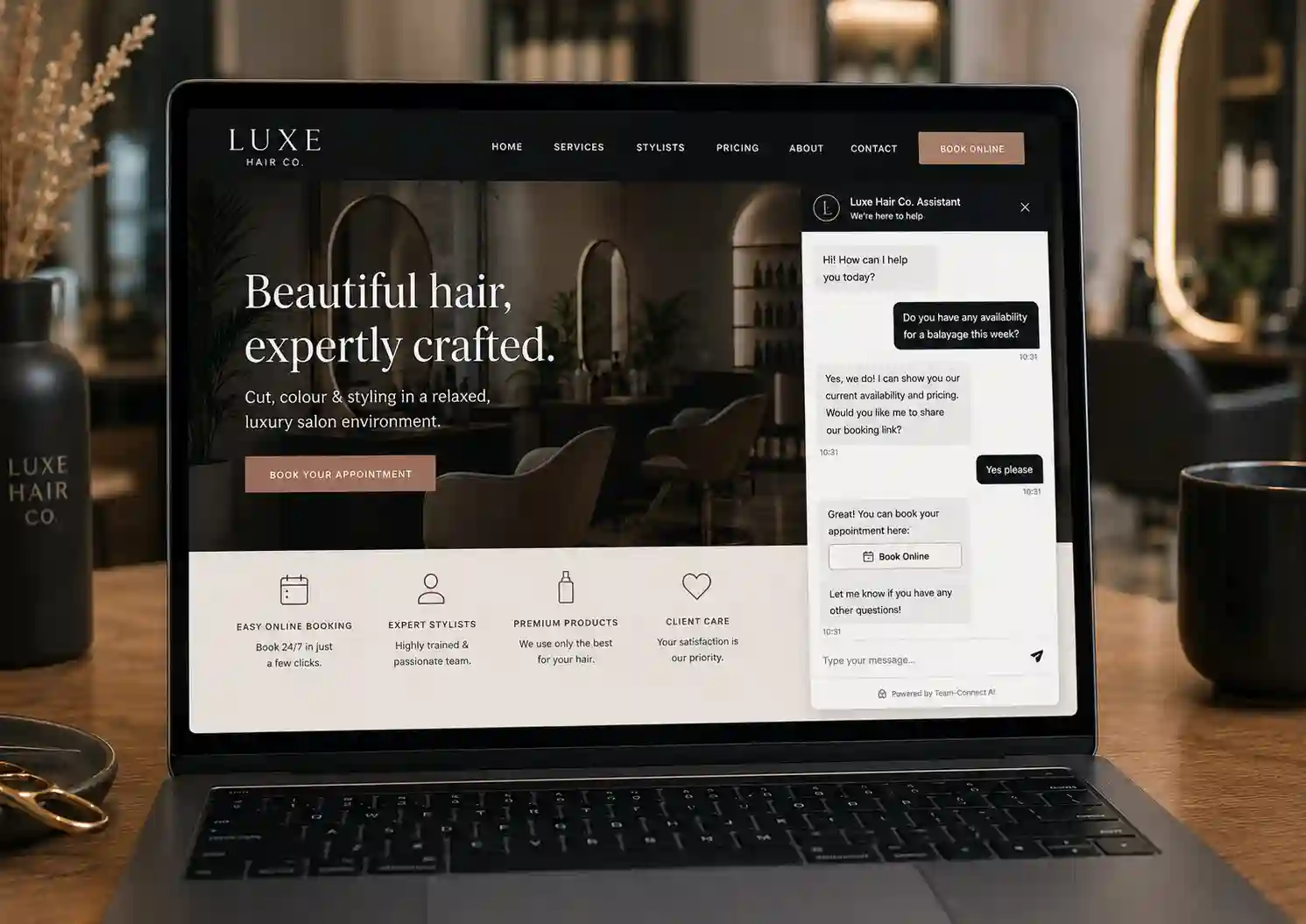
Stylists couldn't pick up the phone mid-cut. The Team-Connect widget answered visitor questions about pricing and availability and shared the booking link 24/7 — bookings up 45% month one.
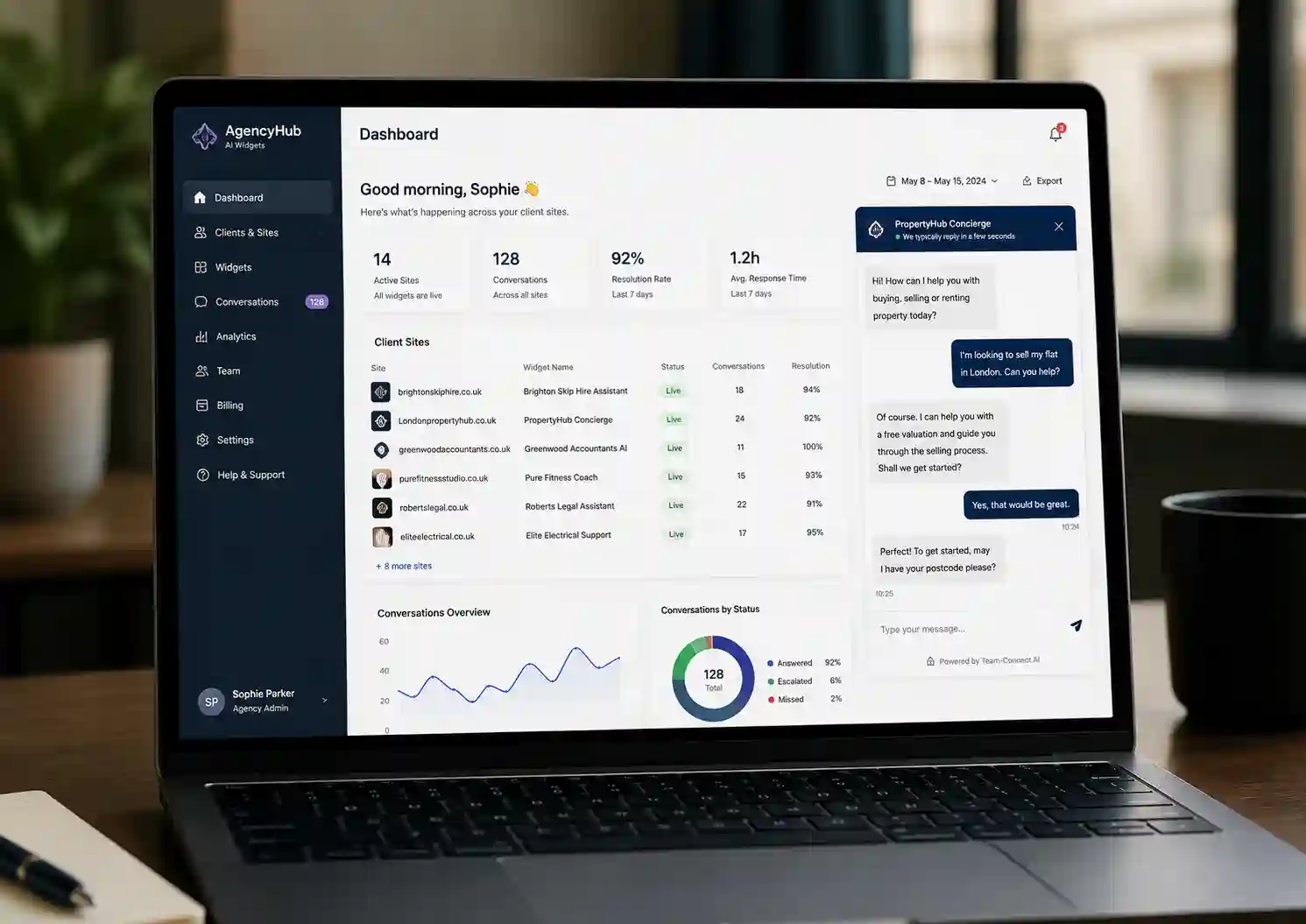
A small UK marketing agency replaced their ad-hoc chat tooling with one Team-Connect subscription serving 14 client sites — each with its own personality and inbox. Adds £980/month in retainer markup.
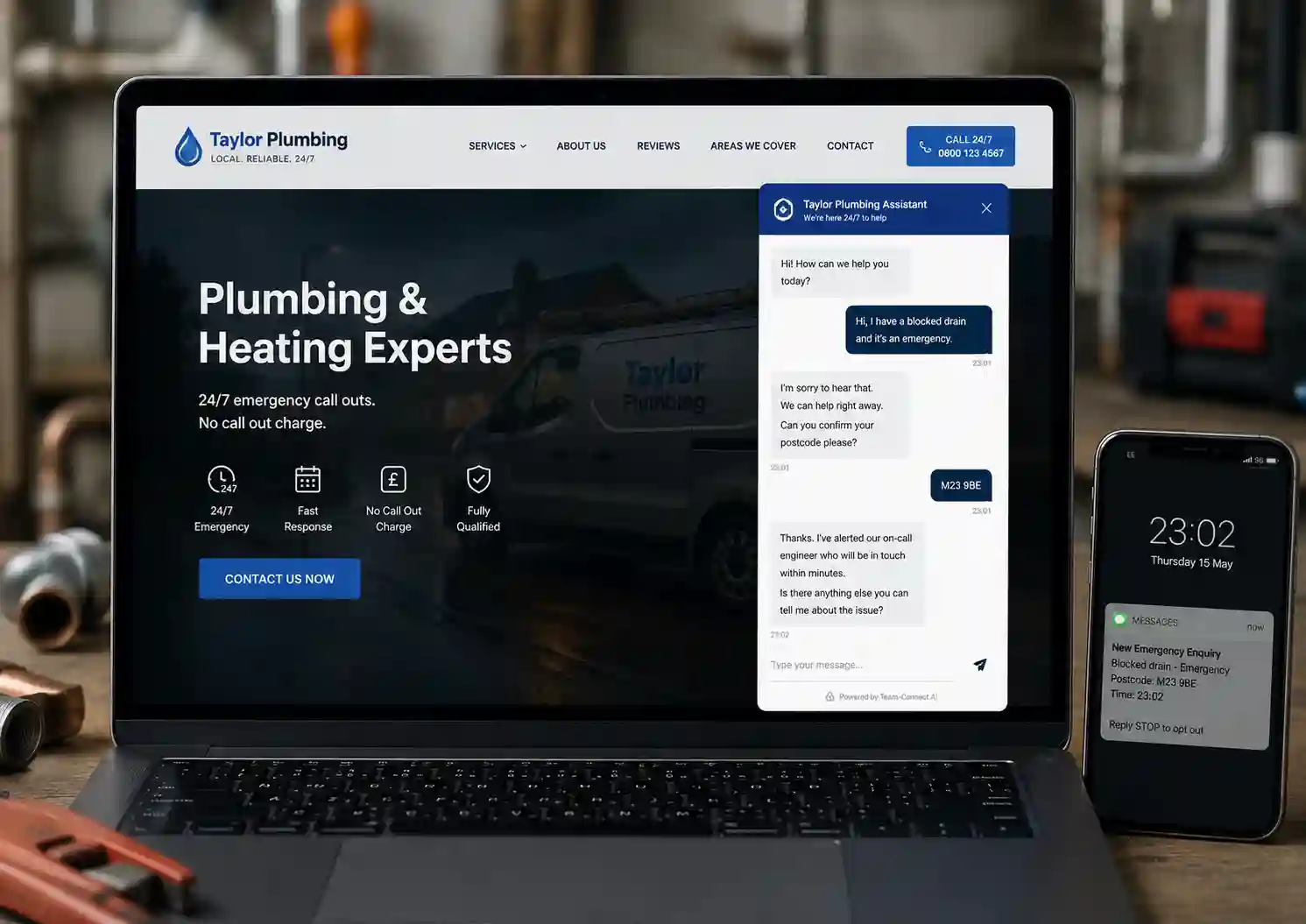
An emergency drainage enquiry came through the widget at 11pm. The AI flagged the word emergency and SMS'd the owner within seconds. Job booked the same night — widget paid for itself ten times over.
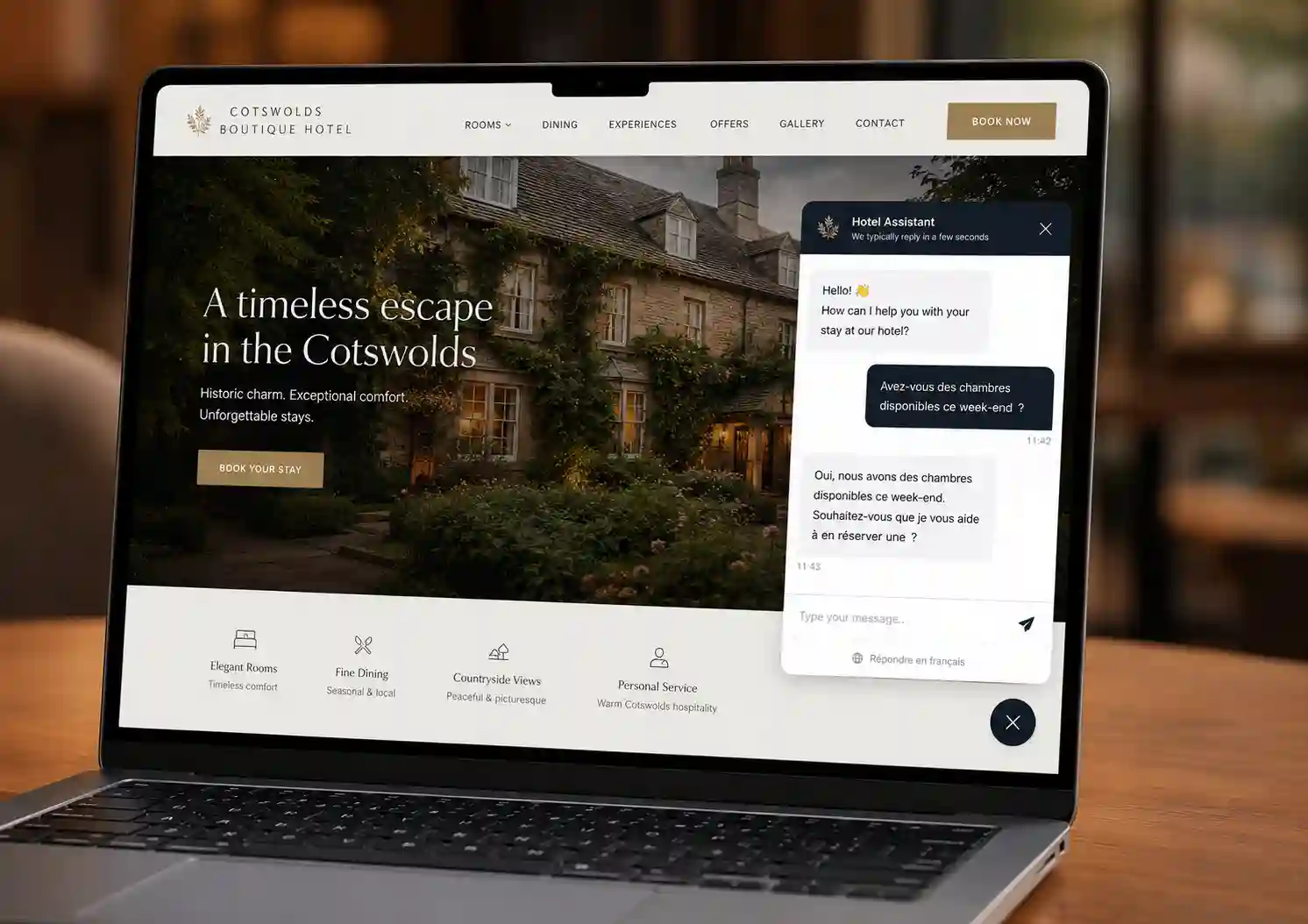
A boutique hotel website gets enquiries in English, French, German and Spanish. The Growth tier auto-detects language and replies in kind. Overseas conversion up 22% with zero translator cost.
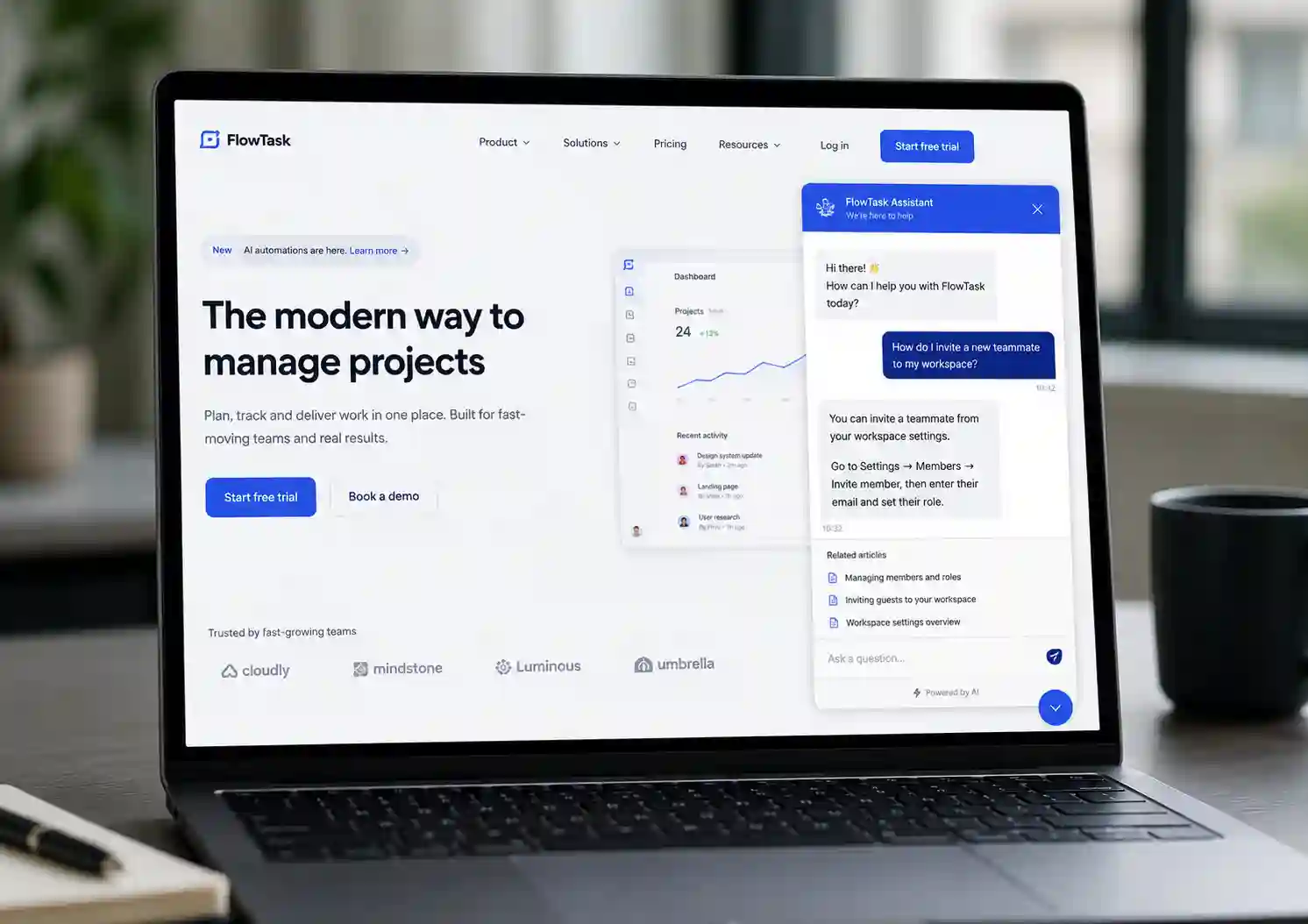
A UK SaaS loaded their entire docs site into a Team-Connect widget. The AI answered 60% of common how-to questions instantly. Support inbox dropped from 200 tickets/week to 80 — team can finally focus on hard cases.
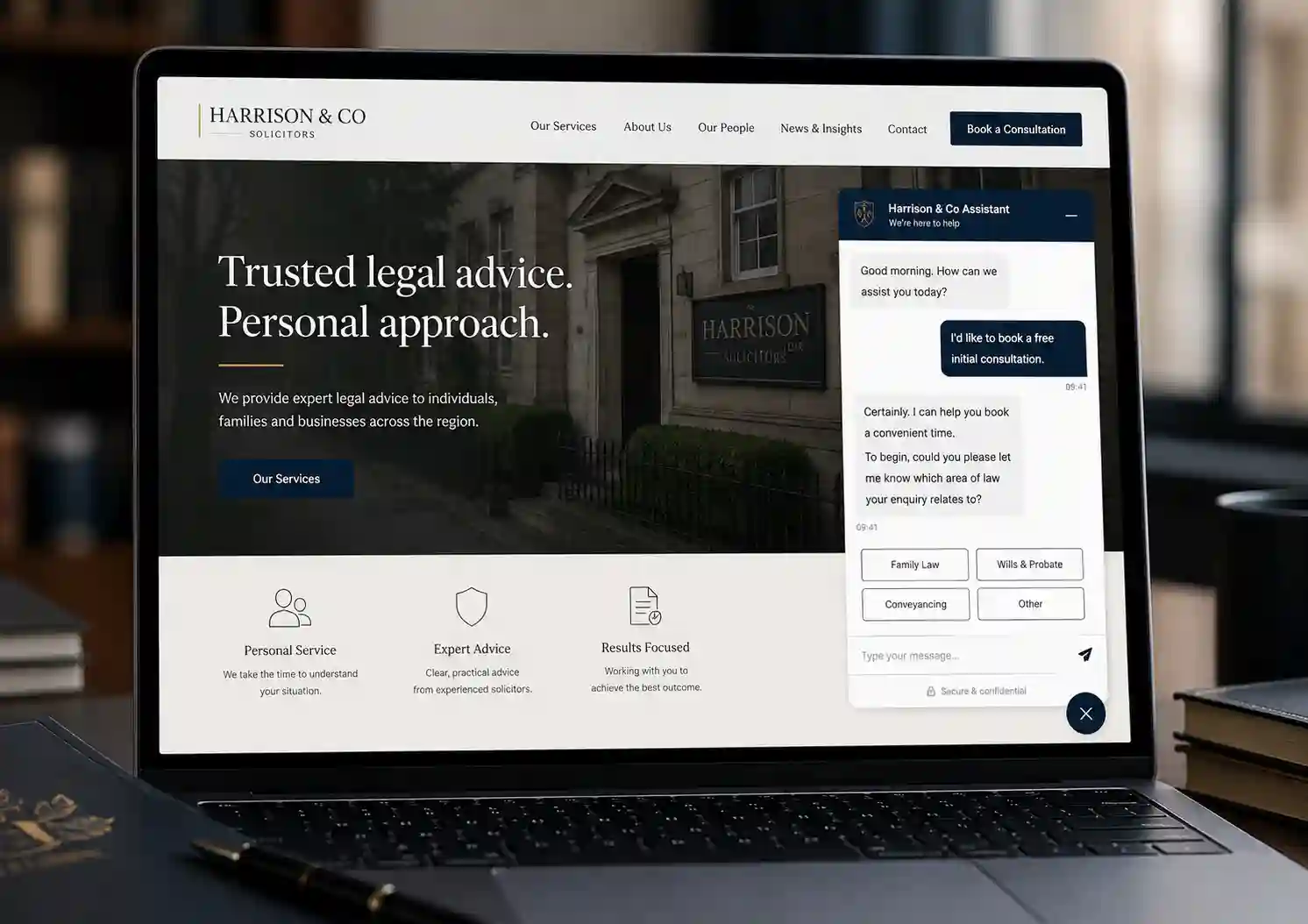
A regional solicitor configured the widget with a formal tone and strict fallback rules. Visitors get qualified by the AI then booked into a free consultation. Consultation bookings tripled inside six weeks.
Guides to building, deploying and scaling AI chat widgets across UK websites
A step-by-step walkthrough of the Team-Connect AI setup assistant. From sign-up to embedded widget on a live site in two minutes flat — including the script tag, multi-widget setup and quick tweaks.
Comparison GuideCost, conversion, coverage and customer-experience compared. We break down when an AI chat widget beats live chat, when live chat still wins, and why most modern UK sites end up running both.
Agency PlaybookThe agency playbook for productising AI chat widgets as a managed service. Pricing models, per-client setup time, white-label considerations and the unit economics of charging £79-£149/month per client.
Industry GuideMissed enquiries cost UK SMEs billions each year. Learn why AI receptionists — on the phone and on the web — have become essential for small businesses to compete.
Product GuideA deep dive into how Team-Connect's AI handles your enquiries round the clock — on phone, on website chat, and via SMS — with instant summaries to your inbox.
Product UpdateThe Team-Connect AI can now manage your account, update call flows, edit widget knowledge, change settings and answer support questions — all from a single conversation.